Table of Contents
If you have ever managed more than one WordPress website, you know the feeling. It usually strikes on a Sunday evening, or right as you are sitting down to dinner with your family. It is the notification—a relentless, buzzing, blinking red alert from your phone or email.
Update available for WooCommerce. Update available for Yoast SEO. Update available for Advanced Custom Fields. Update available for Elementor. Critical security update for Wordfence.
Multiply that by ten, twenty, or fifty websites, and what was once a minor inconvenience transforms into a full-blown, heart-palpitating nightmare. You are staring down the barrel of a chaotic, disorganized, and inherently risky process that has plagued the WordPress ecosystem since its inception: The Great Update.
For years, WordPress professionals—freelancers, agency owners, and in-house developers—have been searching for a silver bullet. They have tried native tools, third-party aggregators, complex SSH scripts, and custom cron jobs. Yet, the chaos remains. Updates are pushed out blindly, backups are forgotten, white screens of death occur, and clients panic.

But what if there was a different way? What if you could step out of the reactionary chaos and step into a world of proactive, centralized, and astonishingly safe website management?
Enter WPMU DEV’s Hub Plugin Manager.
This is not just another dashboard. This is a paradigm shift. It is the definitive end to WordPress update chaos, designed to bring order, safety, and sanity back to your digital life. In this comprehensive, deep-dive exploration, we are going to unravel exactly how the Hub Plugin Manager works, why traditional methods fail, and how this single, unified dashboard truly can rule them all.
Chapter 1: The Anatomy of WordPress Update Chaos
To truly appreciate the cure, we must first intimately understand the disease. Why are WordPress updates so universally dreaded by professionals? It comes down to a perfect storm of fragmentation, risk, and poor native tooling.
The Fragmentation Problem WordPress is an open-source ecosystem. Its greatest strength—the massive repository of plugins and themes—is also its Achilles’ heel. A single WordPress site might rely on a core installation, a premium theme, and twenty-five different plugins, each built by a different developer, using different coding standards, and updated on completely different schedules. When you manage multiple sites, you aren’t just managing updates; you are managing a deeply entangled web of dependencies. An update to a minor utility plugin might conflict with a major page builder. An update to WooCommerce might break a custom payment gateway.
The Risk Factor: The White Screen of Death Every time you click that “Update Now” button, you are rolling the dice. In a best-case scenario, the update takes three seconds, and nothing changes. In a worst-case scenario, a fatal PHP error occurs, the database schema fails to migrate correctly, or two plugins engage in a lethal conflict. The front-end goes blank. The admin dashboard locks you out. You are now in crisis mode, digging through FTP credentials, disabling folders, and praying you have a recent backup. For an agency managing client revenue streams, a broken site due to a bad update is not just a technical failure; it is a breach of trust and a potential loss of revenue.
The Native Dashboard Failure Why not just use the default WordPress Updates page? Because it was designed for a single blog in 2005, not for a modern web agency in 2024. The native dashboard offers no macro-view. It does not tell you if a plugin is safe to update across your entire fleet. It does not allow you to bulk-update specific plugins across multiple sites simultaneously. It forces you to log into each site individually, navigate to the updates page, check the boxes, cross your fingers, and click update. It is a manual, tedious, and profoundly inefficient process that eats into your billable hours.
The Communication Gap When you finally do update a client’s site, how do you communicate that to them? Sending an email saying, “Hey, I updated 14 plugins today, your site didn’t break, you’re welcome,” is unprofessional. Clients want to know that their digital assets are being maintained, but they don’t want to be bogged down in the technical minutiae. The native WordPress dashboard offers zero client reporting tools for updates.
This is the chaotic landscape that WPMU DEV set out to conquer.
Chapter 2: The False Prophets of Management
Before we crown the Hub as the ultimate solution, it is important to acknowledge the existing landscape of management tools and why they fall short of true “chaos ending” capabilities.
For years, the industry standard for managing multiple WordPress sites was tools like ManageWP, InfiniteWP, or MainWP. These were revolutionary in their time. They allowed you to connect to multiple sites via a secure key and perform bulk actions.
However, these tools are increasingly showing their age. They are often built as separate, third-party ecosystems that must be installed alongside your other tools. They can be clunky, slow to load, and suffer from their own update fatigue. More critically, they are often detached from the actual hosting environment and the specific plugins running on the sites.
If an update breaks a site, you have to leave the management tool, log into the broken site, troubleshoot, and then return to the management tool. They act as a remote control, but a remote control cannot fix a broken television.
Furthermore, these legacy tools rarely offer deep integration with premium plugin repositories out of the box. If you manage WPMU DEV plugins, alongside ThemeForest purchases, alongside CodeCanyon tools, alongside standard repository plugins, legacy dashboards struggle to aggregate all those update keys and licenses into one cohesive view.
What the industry needed was not just another remote control. It needed a central nervous system.
Chapter 3: Enter the WPMU DEV Hub – The Philosophy of Centralization
WPMU DEV is not a newcomer to the WordPress space. With over two decades of history, they have built some of the most widely used plugins in the world (like Smush, Hummingbird, and Defender). They understand the WordPress ecosystem from the inside out.
When they built The Hub, they didn’t build it as an afterthought or a side-project. They built it as the foundational layer of their entire ecosystem. The philosophy behind The Hub is absolute centralization. It is the concept of “One Source of Truth.”
The Architecture of Order The Hub operates on a brilliantly simple but technologically robust architecture. It consists of two main components:
1. The Cloud Dashboard: A beautifully designed, lightning-fast web application hosted on WPMU DEV’s enterprise-grade infrastructure.
2. The WPMU DEV Connector Plugin: A lightweight, incredibly secure plugin that you install on your WordPress sites.
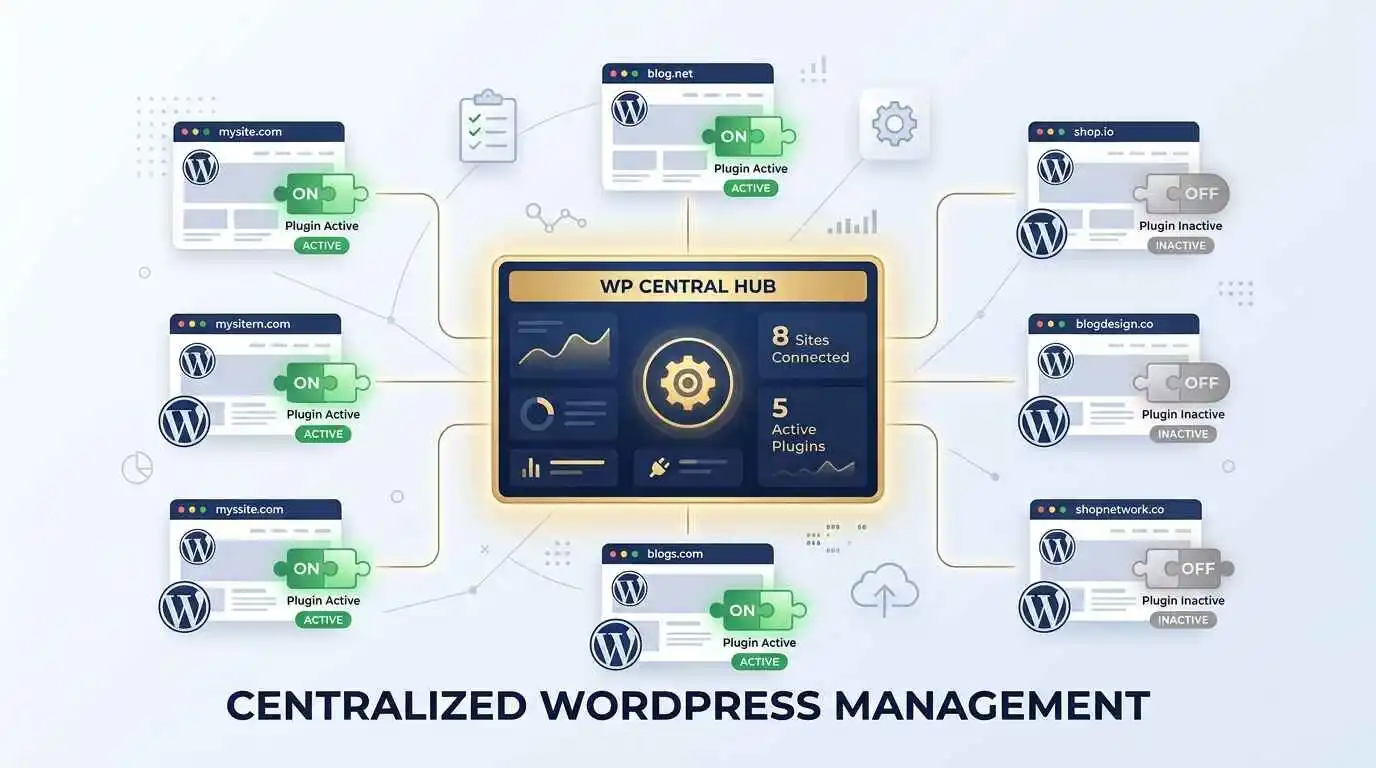
Once the connector is installed, your individual WordPress site “phones home” to The Hub. It establishes a secure, encrypted tunnel. From that moment on, you do not need to log into that WordPress site to manage its plugins, themes, or core files. You manage everything from The Hub. The site becomes a node in your centralized network.
Cognitive Load Reduction From a psychological standpoint, The Hub immediately reduces cognitive load. Instead of holding the mental model of fifty different websites in your head, you hold one. Instead of navigating fifty different admin UIs (some running Gutenberg, some running Classic Editor, some using custom admin themes), you navigate one. The Hub’s interface is clean, intuitive, and designed for speed. It uses color-coded indicators, clear typography, and logical grouping to present complex data in a digestible format.
This is the foundational shift. But the true magic lies in the specific, granular power of the Hub Plugin Manager.
Chapter 4: Deep Dive into the Hub Plugin Manager – The Core Mechanics
The Hub Plugin Manager is not just a list of your plugins. It is an intelligent, automated, and heavily fortified command center. Let us break down the exact features that end update chaos.
1. The Macro View: Seeing the Unseeable When you log into the Hub and navigate to the Plugins section, you are presented with a high-level overview of your entire fleet. You can instantly see how many sites have updates available. But it goes deeper. You can filter by specific plugins. Want to see every site that has a specific version of a page builder installed? You can do that. Want to see which sites are running an outdated, vulnerable version of a security plugin? The Hub lays it all bare in seconds. This macro view is impossible to achieve with native WordPress.
2. Intelligent Bulk Updating (The Right Way) Bulk updating is where legacy tools often fail, either by timing out or by blindly applying updates without discretion. The Hub’s bulk updater is engineered for resilience. You can select multiple sites, select multiple plugins across those sites, and initiate an update. But the Hub doesn’t just fire off a million requests at once and hope for the best. It processes updates systematically. If a server is slow, it waits. If an update fails, it logs the exact error without crashing the entire batch process. You can watch the progress in real-time, seeing green checkmarks populate as sites successfully update, and red alerts if something goes wrong.
3. The Ultimate Safety Net: Pre-Update Automations This is the single most important feature of the Hub Plugin Manager, and the primary reason it ends chaos: Automated Backups.
In the old days, updating was an act of faith. With The Hub, it is an act of engineering. You can configure The Hub so that before it touches a single line of code on a plugin update, it automatically triggers a complete, point-in-time backup of the entire site using WPMU DEV’s Snapshot technology.
If the update causes a white screen of death, you do not need to panic. You do not need to dig through FTP. You simply click a button in The Hub, and the entire site is rolled back to the exact state it was in three minutes prior, before the update ran. This transforms updating from a high-stakes gamble into a zero-risk operation. You can update with absolute, fearless confidence.
4. Granular Auto-Updates WordPress has introduced native auto-updates for plugins and themes, but they are notoriously blunt instruments. It is often an “all or nothing” setting. The Hub provides surgical precision. From The Hub, you can set auto-update rules on a global, per-site, or per-plugin basis.
· Global Rule: Auto-update all minor versions across all sites.
· Site Rule: On the client’s e-commerce site, do not auto-update anything without manual approval.
· Plugin Rule: Always auto-update WPMU DEV Defender (security) and Smush (performance), but never auto-update the custom payment gateway.
This level of granular control means you get the benefits of automation (staying secure and up-to-date) without losing the human oversight required for critical, complex plugins.
5. Centralized License Management One of the most frustrating aspects of managing multiple sites is dealing with premium plugin licenses. You have to remember API keys, login to separate developer portals to download the latest zip file, and upload it to each site. Because The Hub is built by WPMU DEV, it natively manages all WPMU DEV premium licenses. If you have a WPMU DEV membership, every premium plugin you have access to is available to push to any of your connected sites directly from The Hub. No downloading, no uploading, no manual license activation. It is seamless.
Chapter 5: Real-World Scenarios – How the Hub Changes Lives
Theory is great, but let us look at how the Hub Plugin Manager fundamentally alters the daily reality of different types of WordPress professionals.
The Agency Owner: Scaling Without the Overhead Imagine an agency managing 100 client websites. Before The Hub, they likely had a junior developer spending 10 hours a week just logging into sites, checking for updates, running updates, running backups, and sending update reports. That is 520 hours a year—a massive drain on profitability. With The Hub, the agency owner sets the rules: Minor updates auto-apply after a Snapshot backup. Major updates are queued in the Hub dashboard. The senior developer logs into The Hub once a week, reviews the queue of major updates, clicks “Update,” monitors the green checkmarks, and logs out. The 10-hour weekly chore is reduced to a 45-minute review. The agency can take on more clients without needing to hire more staff. Furthermore, the agency can generate professional, white-labeled update reports directly from The Hub to send to clients, proving their value and justifying their retainer fees.
The Freelancer: Buying Back Your Time Freelancers wear every hat: developer, designer, project manager, and accountant. Time is their most precious commodity. The Hub Plugin Manager buys them their life back. Instead of spending a Saturday afternoon updating 15 different websites for 15 different clients, they open their laptop, open The Hub, select all, initiate the process, and watch it complete in minutes. They can then close their laptop and go enjoy their weekend, knowing that if anything breaks, the one-click Snapshot rollback is sitting there as a safety net.
The In-House Corporate Team: Mitigating Risk For a large corporation, a hacked or broken WordPress site is a PR disaster. The IT team cannot afford to let plugins fall out of date due to negligence, but they also cannot afford to push an update that breaks the site during peak business hours. The Hub provides the audit trail and risk mitigation they need. Every update is logged. Every backup is timestamped. The process moves from a chaotic, informal routine to a formalized, secure IT protocol.
Chapter 6: Beyond Updating – Troubleshooting and Maintenance
Ending update chaos is just the beginning. The Hub Plugin Manager also streamlines the downstream effects of plugin management: troubleshooting and maintenance.
Centralized Logging When a plugin conflicts on a native WordPress site, you have to navigate to the WP-Config file, turn on WP_DEBUG, replicate the error, check the debug.log file, and decipher the PHP errors. The Hub brings crucial logging to the cloud dashboard. If an update fails, the Hub often captures the error output right in the UI. You can see why the update failed without ever logging into the site’s backend. This drastically reduces troubleshooting time.
Deactivation and Activation at Scale Sometimes, an update doesn’t break the site, but it causes a subtle bug (e.g., a layout shift on mobile). To isolate the bug, you need to deactivate plugins one by one. If you are testing on a staging site managed by The Hub, you can deactivate and reactivate plugins from the cloud interface, rapidly isolating the culprit without constantly refreshing a local admin panel.
Plugin Auditing Over time, websites accumulate “plugin bloat”—plugins that were installed for a specific purpose two years ago and then forgotten. They pose a security risk and slow down the site. The Hub Plugin Manager gives you a clear, sortable list of every plugin across your fleet. You can easily identify sites that are running heavy, unnecessary plugin loads and clean them up, improving performance and security across your entire portfolio simultaneously.
Chapter 7: The Security Imperative
We cannot talk about plugin updates without talking about security. It is an uncomfortable truth, but the vast majority of hacked WordPress sites are not compromised through zero-day vulnerabilities in the WordPress core. They are compromised because a site owner failed to update a known-vulnerable plugin.
Hackers use automated bots that constantly scan the internet for websites running outdated versions of popular plugins. If you are running a version of a plugin with a known CVE (Common Vulnerabilities and Exposures), it is not a matter of if you will be targeted, but when.
The Hub Plugin Manager acts as a formidable security shield by default. By making the update process so fast, so safe (via backups), and so visible, it removes the friction that leads to update negligence. When you can log into one dashboard and instantly see a red alert indicating that Site A and Site B are running a vulnerable version of a contact form plugin, you are exponentially more likely to fix it immediately than if you had to discover that vulnerability by logging into Site A and Site B separately.
Furthermore, the integration with WPMU DEV’s Defender security plugin means that hardening measures (like disabling file editing or hiding the login page) can be managed right alongside your plugin updates, creating a holistic security posture.
Chapter 8: The Future of WordPress Management
The introduction of tools like the Hub Plugin Manager signals a broader shift in the WordPress ecosystem. As the web becomes more complex, the era of the “lone wolf” developer manually managing individual WordPress installations is coming to an end. The future is centralized, automated, and cloud-native.
We are moving toward a time when updating a plugin will be viewed with the same casual indifference as updating an app on your smartphone. You do not panic before updating Instagram; you just let it happen in the background, knowing that if something goes wrong, you can delete and reinstall it.
The Hub is bringing that level of maturity to the WordPress backend. By abstracting the management layer away from the individual site and into a centralized cloud environment, WPMU DEV is future-proofing the WordPress management experience. As WordPress continues to evolve—with the Full Site Editing era, the proliferation of block plugins, and the increasing complexity of PHP versions—a centralized, intelligent dashboard will transition from a “nice-to-have” luxury to an absolute operational necessity.
Conclusion: Taking Back Your Time and Sanity
WordPress powers over 40% of the web. It is a phenomenal, flexible, and empowering platform. But for too long, the day-to-day management of that platform has been a fragmented, stressful, and risky endeavor. The anxiety of the “Update Now” button has caused sleepless nights for freelancers and lost profits for agencies.
WPMU DEV’s Hub Plugin Manager is not just a feature; it is a cure.
By providing a single, unified dashboard to view, update, automate, and rollback plugins across an unlimited number of sites, it systematically dismantles the anatomy of update chaos. It replaces fear with confidence through automated Snapshot backups. It replaces tedious manual labor with intelligent bulk actions. It replaces client confusion with professional reporting.
It truly is one dashboard to rule them all.
If you are currently managing more than three WordPress sites, and you are still logging into each one individually to handle updates, you are not just wasting time—you are taking unnecessary risks with your clients’ businesses and your own sanity.
The tools to escape the chaos exist. The question is no longer whether you can afford to adopt a centralized management solution like The Hub; the question is whether you can afford not to. Reclaim your time, secure your sites, and step into the future of WordPress management. Your Sunday evenings will thank you.
Disclaimer: The content on this blog is for informational purposes only. The author’s opinions are personal and not endorsed. Efforts are made to provide accurate information, but completeness, accuracy, or reliability are not guaranteed. The author is not liable for any loss or damage resulting from the use of this blog. It is recommended to use the information on this blog at your own discretion.
WPMU DEV Plug ins are available with Premium Subscription Plans, Mail @ info@cloudtechbull.com
